How to Track Everything You Watch and Read in One App (2026 Guide)
Most of us watch and read across a dozen places: Netflix, Prime Video, JioHotstar, Crunchyroll, the cinema, a Kindle and a pile of paperbacks. Keeping track of it all in your head does not work, and three separate apps is too much effort. This step-by-step guide shows how to track movies, TV shows, anime and books in one free app, and how to turn that history into stats you will actually enjoy looking at.
Why track what you watch and read?
- Stop forgetting. "Did I finish season 3?" and "Have I read this author before?" get instant answers.
- Decide faster. A short, curated watchlist and reading list beats scrolling streaming apps for 20 minutes.
- See your taste. Genre breakdowns, favorite decades and top authors reveal patterns you did not know you had.
- Remember the good stuff. A Hall of Fame of your all-time favorites makes recommending things to friends easy.
- Make it a habit. Streaks, levels and badges turn logging into something you look forward to.
Option 1: a spreadsheet (and why most people quit)
Plenty of people start with a Google Sheet: title, date, rating. It works for a few weeks, then breaks down. You have to type every title by hand, there are no posters, no episode counts, no watch time totals and no reminders of what is next. If you already have one, do not throw it away: you can import it into a tracker app in one step.
Option 2: separate apps for each thing
Another common setup is Letterboxd for films, a TV tracker for series, MyAnimeList for anime and Goodreads for books. Each is good at its job, but your history ends up split across four accounts, and none of them can tell you how much time you really spend on entertainment overall. After TV Time shut down in July 2026, many people also learned how risky it is to keep years of history in one app with no export.
Option 3: one app for everything
BingeMark is a free Android app built to track movies, TV shows, anime and books in one place, with shared stats and your data always exportable. Here is how to set it up.
Step 1: install and choose what you track most
Install BingeMark from Google Play and sign in with Google. The first question is what you track most: Watch, Read or Both. This only sets which side the app opens on; you can switch between Watch and Read at any time with the toggle at the top of the Home screen.
Step 2: seed your library in two minutes
New accounts are asked to pick a few movies and shows you have already watched, then a few books you have read. Tapping posters is much faster than searching, and it immediately fills your stats so the app feels alive from day one.
Step 3: import your old history
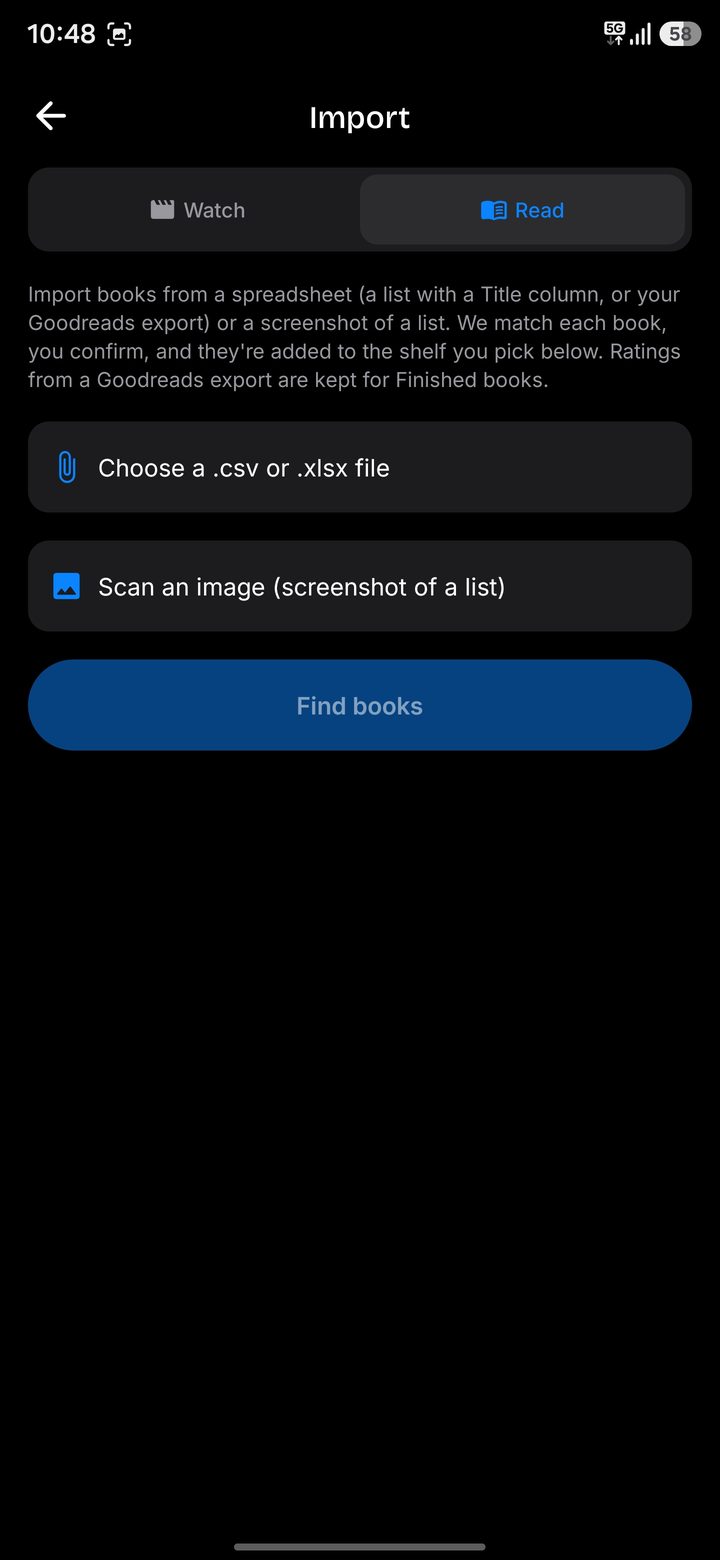
If you have a spreadsheet of titles or your Netflix viewing history, go to Profile, then Import titles, then Watch. BingeMark reads the titles, matches each one to the right movie or show and lets you confirm before anything is saved. Netflix episode rows are grouped into their show automatically. For books, switch to the Read tab and import your Goodreads export, a spreadsheet or a screenshot of a list.
Step 4: log as you go
From now on, logging takes seconds:
- Movies: tap Mark watched on the movie page. Add a date and a note if you like, and log rewatches separately.
- TV shows and anime: tick episodes or whole seasons. Shows you have started move to your Watching list, and finished ones move to Watched.
- Books: scan the barcode or search, mark it Reading and update the page you are on, or start the reading timer and let BingeMark log the session.
- From other apps: share a title from Netflix or other streaming apps straight to BingeMark to open it there.
Step 5: keep a watchlist and reading list you will actually use
Add anything you want to watch to your Watchlist and anything you want to read to your Wishlist. Every movie page shows where it is streaming, its IMDb rating and similar titles, so when you open your list on a Friday night you can decide in a minute. Use the sort and filter options in your Library to narrow it down by type, year or rating.
Step 6: build your Hall of Fame
Your Hall of Fame is a short, hand-picked list of your all-time favorites across movies, series, anime and books. It is the best way to show your taste, and it appears on your yearly Wrapped.
Understanding your stats
The Home screen turns your history into a dashboard. On the Watch side you will see total watch time in days and hours, counts of movies, TV shows and anime, your average rating, a genre breakdown and the decades you watch most. On the Read side you get total reading time, books finished, pages read, authors read and your average rating. You also earn XP and levels, unlock badges and keep a single daily streak that counts both watching and reading.
At the end of the year, your Wrapped card combines everything into one image you can save or share: watch time, reading time, top genres and your Hall of Fame.
Keep your data safe
Whatever app you use, make sure you can get your data out. In BingeMark, Profile has Export my data, which downloads an Excel file with separate tabs for your Watchlist, Watching, Watched, Hall of Fame and every book shelf, and Google Drive backup, which keeps an up-to-date copy in your own Drive.
Tips for a tracking habit that sticks
- Log immediately. The best time to log is the moment the credits roll or you close the book.
- Keep lists short. Remove things you have lost interest in. A long backlog makes choosing harder.
- Rate honestly. Your ratings power your average and make your Hall of Fame meaningful.
- Check stats weekly. Watching your numbers grow is what keeps the habit alive.
- Protect your streak. Even one episode or ten pages a day keeps it going.
Start tracking today
Tracking everything you watch and read does not need to be complicated. With one free app you get a watchlist, a reading list, a complete history and stats that make your habits visible. Download BingeMark on Google Play, or compare it with other options in our guides to the best movie tracker apps, the best anime trackers and the best Goodreads alternatives.
Frequently asked questions
Is there one app to track movies, TV shows, anime and books?
Yes. BingeMark is a free Android app that tracks movies, TV shows, anime and books in one place, with shared stats, levels and a yearly Wrapped.
Can I import my Netflix viewing history?
Yes. Download your viewing history from your Netflix account and import it in BingeMark under Profile, then Import titles. Episodes are grouped into their shows automatically.
Can I export my watch history?
Yes. BingeMark exports your full library, including book shelves, to an Excel file and can back it up automatically to your Google Drive.
Does reading count towards my streak?
Yes. BingeMark keeps one daily streak that counts both watching and reading.
Track everything you watch and read
BingeMark is a free Android app for movies, TV shows, anime and books, with watch time stats, levels, badges and a yearly Wrapped.
Get BingeMark on Google Play